Why React re-renders: understanding the Fiber work loop
Most React performance problems are really scheduling problems. A practical look at Fiber, reconciliation, and what actually happens after setState.
Ask most developers what React does and they'll tell you it renders components. Which is true, and also exactly why so many performance conversations end up in completely the wrong place.
Modern React is less a rendering library than a scheduling system. The interesting question was never how a component renders; it's when React decides the work should happen, and what it's willing to throw away to keep the page feeling alive.
The mental model most of us start with
The original React model was refreshingly simple. State updates, React walks the component tree, anything that needs updating gets reconciled, the DOM changes. Done.
For a small app, that works perfectly. For a large one it has a nasty edge: rendering can't be interrupted. A sufficiently expensive update will sit on the main thread long enough for the user to feel it - the dropped frame, the input that lands half a second late. The problem was never correctness. It's responsiveness, which is a much harder thing to fix.
Enter Fiber
React Fiber exists to solve precisely that.
Instead of treating a render as one big indivisible lump of work, React breaks it into small units that can be paused, resumed, reprioritised, or abandoned entirely. Every component in the tree is represented internally as a Fiber node.
When an update comes in, React builds a work-in-progress tree and processes it incrementally. If something more urgent shows up mid-render, React can down tools, deal with it, and pick the original work back up afterwards. That's the whole trick behind staying responsive while a lot of work is queued. Rendering stopped being a thing that happens and became a thing that gets scheduled.
Rendering is not committing
The single most common React performance misconception is treating rendering and DOM updates as the same event. They aren't.
React's work splits into two phases:
- Render phase: work out what should change.
- Commit phase: apply those changes to the DOM.
The render phase can be interrupted. The commit phase cannot.
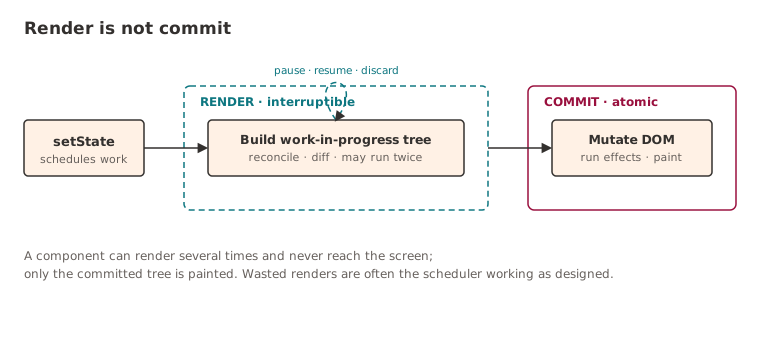
That one distinction explains a surprising amount of otherwise baffling behaviour. A component can render several times without a single pixel changing on screen, because React is exploring possibilities, and only the final committed result ever reaches the browser.
Why React sometimes throws work away
Developers are often a bit affronted to learn that React will do work and then bin it. This is deliberate, and it's a feature.
Picture a search box where someone's typing quickly. Each keystroke schedules an update, and the expensive part (filtering and rendering a big result list) is marked non-urgent:
import { useDeferredValue } from "react";

const query = useDeferredValue(rawQuery); // "rea" → "reac" → "react"
const results = useMemo(() => filter(data, query), [query, data]);
These updates arrive across separate keystrokes rather than in one tick, so React can't simply batch them out of existence. And there's genuinely no point fully rendering the list for "rea" once "reac" has already landed; it's a move you'd want to take back the instant you'd played it.
Because the deferred render is interruptible, the scheduler can abandon the lower-priority work the moment a newer keystroke turns up - and get on with producing the latest result instead. Seen this way, "wasted renders" aren't always waste. Quite often they're the scheduler doing exactly the job it was designed to do.
Most React performance issues aren't React issues
When a team goes hunting for frontend performance problems, React tends to get collared first. In practice, the bottleneck is usually somewhere else entirely:
- Large datasets rendered when they didn't need to be.
- Far too many DOM nodes.
- Expensive layout calculations.
- Memoisation boundaries drawn in the wrong places.
- Components subscribed to far more state than they actually use.
More often than not, React is doing precisely what it was told to do. The application is just asking it for an absurd amount of work and then acting surprised when it obliges.
Optimise less, understand more
useMemo, useCallback and memo are useful tools. They're also reached for constantly, by reflex, before anyone has worked out what the actual problem is, which is paying an insurance premium on a risk nobody has measured.
The best optimisation is understanding why React thinks the work needs doing in the first place, the same habit that pays off one layer down in the engine itself. Once the work loop makes sense, a lot of performance problems get much easier to reason about. You stop asking why a component rendered, and start asking why React scheduled that work. That's almost always where the answer's been hiding.
Further reading
- Render and Commit (react.dev): the canonical explanation of the two phases, with the render phase computing changes and the commit phase touching the DOM.
useDeferredValuereference (react.dev): the primary source for deferred values and why the background render is interruptible when a newer value lands.- Fix the slow render before you fix the re-render: Kent C. Dodds on why a slow render hurts even when every render is necessary, so profile before you memoise.
- Before You memo(): Dan Abramov on avoiding re-renders by moving state down and lifting content up, before reaching for
memoat all.
Keep reading
New writing, now and then
Occasional notes on platform engineering, building dependable software and that constant buzz word we doom scroll past on LinkedIn! No cadence promised.