The event loop is not what you think
Most explanations stop at the call stack and callback queue. The reality is more interesting, and explains many of the bugs engineers encounter in production.
Every JavaScript developer eventually gets handed the same interview question:
Promise.resolve().then(() => console.log("promise"));
setTimeout(() => console.log("timeout"), 0);
console.log("sync");
The output is:
sync
promise
timeout
And most explanations stop right there. Microtasks beat macrotasks, well done, here's your offer letter. The trouble is that this mental model survives exactly until the first time you have to debug something that actually pays the bills.
JavaScript is single-threaded. The browser isn't.
JavaScript runs on a single thread. The browser it lives inside does not.
Networking, timers, rendering, user input, painting, compositing: none of that happens on your thread. It all goes on around you while your code is busy.
The event loop is the thing coordinating that lot, and its job isn't really "execute callbacks" - it's to decide when JavaScript gets another turn. Everything else is downstream of that one decision.
Tasks and microtasks
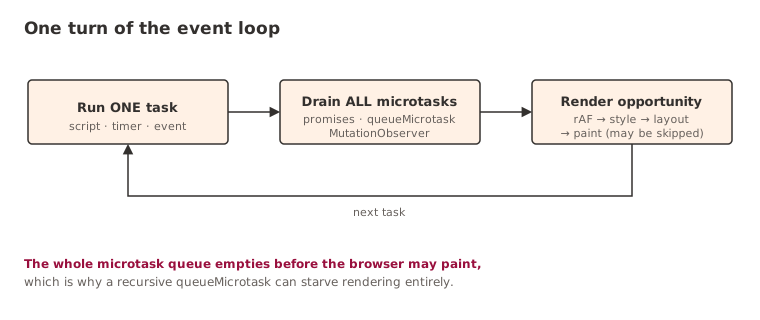
At a high level, the browser works in cycles. First it runs a task:
- Script execution
- Timer callbacks
- DOM events
- Message channel events
When that task finishes, it drains the entire microtask queue before it does anything else:
- Promise callbacks
queueMicrotask- Mutation observers
"Drains the entire queue" is the part people skip over - and it's the part that matters. Every microtask runs before the browser is allowed to move on to the next task. No exceptions, no taking turns.
Which is why this:
setTimeout(() => console.log("timeout"), 0);
Promise.resolve().then(() => console.log("promise"));
still prints:
promise
timeout
regardless of what you set the timer to. The promise is a microtask, the timeout is a task, and microtasks never wait their turn behind a task. You could set that timer to zero or to a fortnight; the ordering doesn't budge.
Why zero milliseconds is never zero milliseconds
The most stubborn myth in all of this is that:
setTimeout(fn, 0);means "run immediately." It doesn't, and it never has. What it actually means is:
Run this callback during a future task, after the current work has finished.
The browser decides when that future arrives, not you. Rendering, user input, other queued tasks and timer clamping can all shove your callback further down the line. You haven't scheduled the work for now. You've merely made it eligible, and handed the timing to someone else.
You can accidentally block rendering
Here's one that catches everyone at least once:
button.addEventListener("click", () => {
  element.textContent = "Loading...";
  doExpensiveWork();
});
The assumption is that the spinner shows up, then the heavy lifting starts. It doesn't.
The text content does change in the DOM straight away, but the browser cannot paint while JavaScript is still on the call stack, and doExpensiveWork keeps that stack busy right up until it returns. By the time control finally comes back to the browser, the work is already done, so there's nothing left to show. The user never sees "Loading..." at all.
That single fact explains an enormous number of "the spinner never appeared" bugs. The problem was never the rendering. The problem was that the browser never got a moment to paint.
Microtasks can become a trap
Because microtasks all run before the browser is allowed to continue, they can quietly starve everything else. Watch:
function loop() {
  queueMicrotask(loop);
}

loop();
That queue never empties, so the browser never gets past it. Rendering, timers, user interaction - all held hostage indefinitely.
Nobody writes this on purpose, of course. You back into it through a chain of promises, an observer, and a bit of framework internals you've never read. Suddenly the tab's frozen and the call stack looks entirely innocent.
Understanding responsiveness
When someone calls an application "slow", they're almost never talking about algorithmic complexity. They mean responsiveness. Can the interface react to input? Can it update the screen? Can it deal with the next event? The event loop sits underneath all three.
Once it clicks, your whole picture of performance shifts. You stop reading JavaScript as a list of statements that run top to bottom, and start reading it as one player in a much bigger scheduling game.
In that game the important question is never "what does this code do" but "when does the browser get a move in." That's a far more useful way to think about building for the web.
Further reading
- Tasks, microtasks, queues and schedules: Jake Archibald's definitive walk through task and microtask ordering, complete with interactive diagrams and real browser quirks.
- The event loop (WHATWG HTML Living Standard): the canonical processing model; dense, but it is the source of truth for everything above.
- Using microtasks in JavaScript with queueMicrotask() (MDN): when to reach for a microtask, and the ordering rules that make them sharp-edged.
- The Node.js event loop, timers and process.nextTick() (Node.js docs): how the model changes off the browser, with libuv's phases and the nextTick queue.
Keep reading
New writing, now and then
Occasional notes on platform engineering, building dependable software and that constant buzz word we doom scroll past on LinkedIn! No cadence promised.