JavaScript security essentials: the pitfalls that still break production
Most JavaScript security failures aren't exotic. They come from trusting the wrong boundary, executing the wrong string, or forgetting how much power the browser hands to whoever turns up.
JavaScript is one of the most security-sensitive languages we work in, and not because the language is uniquely dangerous. It earns that reputation from where it sits.
JavaScript lives on the boundary between users, browsers, APIs, cookies, tokens, third-party scripts, payment forms, analytics tags and whatever backend the business actually runs on. It is the bit of the stack that touches everything, which makes it the bit where the trust assumptions tend to fall apart.
That is where most of the trouble comes from. Not from obscure corners of the language spec, and almost never from the clever attack you'd see in a conference talk. The incidents that take a production system down are nearly always a familiar pattern used in the wrong place, by someone who assumed a boundary held when it didn't.
The browser is hostile by default
A browser application runs on a machine you do not own and cannot trust. The person at the keyboard can open the dev tools, read every line you shipped, rewrite your JavaScript, replay requests, edit local storage, intercept the network and call your APIs directly without ever loading your page. None of that is exotic; it's a Tuesday.
So the only safe assumption is that anything you send to the browser is public. That includes the things people quietly hope are private:
- Feature flags.
- API URLs.
- Validation rules.
- Pricing logic.
- Hidden form fields.
- Client-side permissions.
- Obfuscated business logic.
Client-side checks earn their keep by making the interface pleasant: catch the empty field before the round trip, grey out the button the user can't use, fail fast and politely. That is a real and worthwhile job. It is just not a security job.
The server has to behave as though every request was hand-crafted by someone trying to break it, because sooner or later one will be. The frontend can guide. It cannot enforce.
Cross-site scripting is still the big one
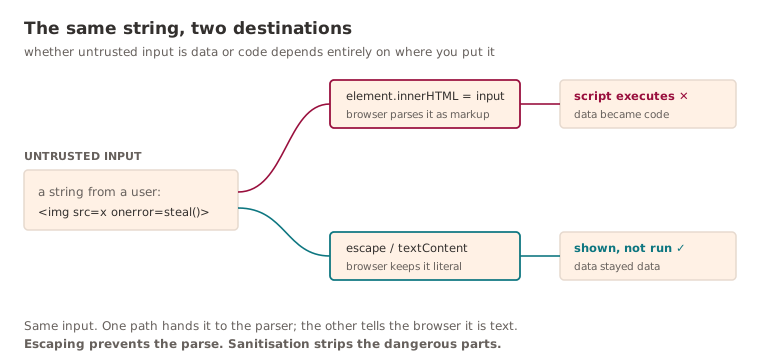
Cross-site scripting, XSS, has been near the top of every sensible list of web vulnerabilities for the better part of two decades, and it stays there for a simple reason - it turns data into code. The moment a string you treated as content gets parsed as markup, the attacker is no longer filling in a form, they're writing part of your application.
The dangerous pattern is almost insultingly small:
element.innerHTML = userInput;If userInput carries executable markup, the browser is well within its rights to run it. You didn't write a vulnerability so much as hand the parser a loaded instruction and look away.
Modern frameworks took a large bite out of this by escaping values for you. Render a value the ordinary way and React treats it as text, not markup:
return <div>{userInput}</div>;The protection is real, right up until someone steps off the safe path because they needed to render some HTML and the easy escape hatch was sitting right there:
<div dangerouslySetInnerHTML={{ __html: userInput }} />The name is doing its best to warn you. There are legitimate reasons to render HTML you didn't author, but the rule around it should be unbending:
Untrusted HTML must be sanitised before it reaches the DOM.
It also pays to be precise about two words that get used interchangeably and shouldn't be. Escaping prevents data from being interpreted as markup at all: every character is shown, nothing is run. Sanitisation keeps some markup and strips the dangerous parts, so a comment can stay bold without also being allowed to ship a <script>. They solve different problems, and confusing the two is a reliable way to ship a hole while feeling thoroughly responsible about it.
eval is almost never worth it
JavaScript makes it trivial to turn a string into a running program:
eval(userInput);In application code, that power is almost never the thing you actually needed. The same goes for its quieter relatives, which do the same job while looking more respectable:
new Function(userInput);
setTimeout("doSomething()", 100);
setInterval("doSomething()", 100);
Every one of these opens a path where a string can become an instruction. In a system that handles anything worth protecting, that should read as a design smell rather than a clever shortcut. If the behaviour really does need to be dynamic, say so explicitly with a lookup instead of a parser:
const actions: Record<string, () => void> = {
  refresh: refreshData,
  logout: logoutUser,
};

actions[actionName]?.();
A lookup table is boring. It has no ambition. It cannot be talked into running something you never wrote - and in security, that lack of imagination is exactly the quality you want.
JSON is data, not code
One of the older JavaScript own-goals was treating JSON-shaped data as if it were JavaScript, because for a while the two looked close enough to get away with it:
const data = eval("(" + responseText + ")");The correct version is not subtle:
const data = JSON.parse(responseText);JSON.parse parses. eval executes. That is the whole distinction, and it is not negotiable: one reads a value, the other runs whatever happens to be in the string.
Parsing is necessary but it is not the finish line. JSON.parse only proves the input is syntactically valid JSON. It says nothing about whether the shape, the values or the meaning are anything you'd want to act on, so validation still has to happen afterwards. Valid JSON and safe JSON are not the same claim.
Prototype pollution
JavaScript's object model has a quirk that produces a whole class of bugs most engineers never think to look for: prototype pollution. Merge untrusted input into an object the naive way and you've opened the door:
function merge(target: any, source: any) {
  for (const key in source) {
    target[key] = source[key];
  }
}
Now imagine the source is attacker-controlled and arrives looking like this:
{
  "__proto__": {
    "isAdmin": true
  }
}
Write that key straight onto the target and you may not be setting a property on one object so much as editing the prototype every other object inherits from. A flag nobody set starts coming back true in places that never touched the request.
The fix starts with treating keys from untrusted sources as suspect, not data:
const blockedKeys = new Set(["__proto__", "constructor", "prototype"]);

function safeAssign(target: Record<string, unknown>, source: Record<string, unknown>) {
  for (const [key, value] of Object.entries(source)) {
    if (blockedKeys.has(key)) continue;
    target[key] = value;
  }
}
Better still, don't deep-merge untrusted objects at all unless you've got a concrete reason. Validate against a schema, take the fields you expected and ignore the rest. And when you need a plain bag of key-value pairs with no inheritance to pollute, Object.create(null) gives you a dictionary with no prototype to aim at in the first place.
Local storage is not a vault
There's a persistent habit of treating browser storage as if it were a safe. It isn't, and it was never advertised as one. Anything sitting in:
localStoragesessionStorageIndexedDB- JavaScript-readable cookies
is readable by any JavaScript running on the page, yours or otherwise. Which means the day an XSS bug lands, a session token you tucked into localStorage is just sitting there waiting to be read and posted somewhere unpleasant.
For session tokens specifically, an HttpOnly, Secure, SameSite cookie is usually the safer home, precisely because JavaScript can't read it. That is not a magic spell, mind. Those cookies still want CSRF protection, a sane SameSite setting, HTTPS and careful domain scoping. The broader rule survives all the nuance:
Never store secrets in JavaScript-accessible storage.
CSRF did not disappear
When single-page apps became the default, a lot of teams filed CSRF under "solved". It wasn't, at least not everywhere. If your authentication rides on cookies, the browser will happily attach those cookies to outbound requests on your behalf, which is exactly the behaviour a cross-site request forgery depends on. A malicious page can get a logged-in user's browser to fire an authenticated request without the user doing anything more incriminating than visiting.
The usual defences still apply:
SameSitecookies.- CSRF tokens.
- Origin and Referer validation.
- Requiring a custom header for state-changing requests.
Moving auth to a bearer token in a header sidesteps a chunk of CSRF, because the browser doesn't attach those automatically. It also raises the stakes on XSS, because now the token lives somewhere JavaScript can reach it. You have not removed the risk so much as relocated it. Security is rarely free; it's usually a trade you're choosing whether you admit it or not.
CORS is not authentication
CORS gets misread more often than almost anything else in the browser security model. All it governs is whether the browser will let frontend JavaScript read a cross-origin response. That's the entire remit.
So this header is not a security boundary:
Access-Control-Allow-Origin: https://trusted-site.comIt's a browser policy, and it only binds browsers. A script, curl, Postman or a backend service can send the same request and read the reply regardless of what your CORS configuration says, because none of them are asking the browser's permission. Your API has to authenticate and authorise every request on its own merits. CORS can cut down on browser-based abuse. It cannot tell you who is calling.
Client-side authorisation is not authorisation
Hiding a button is not the same as withholding a permission, however much it looks like it in the demo.
This is not security:
{user.role === "admin" && <DeleteButton />}It is a courtesy. It keeps the interface tidy and stops ordinary users tripping over actions they can't take. It does precisely nothing to stop someone who opens the network tab and calls the endpoint directly, because the gate is drawn in the UI, not enforced on the server.
The actual check has to live where the action does:
if (!currentUser.canDelete(resource)) {
  throw new ForbiddenError();
}
Every sensitive action needs server-side authorisation, every time. The frontend can point people at the right doors. It can't be trusted to lock them.
Dependency risk is JavaScript risk
A modern JavaScript app routinely ships thousands of transitive dependencies, most of which nobody on the team has read or could name. That is a large surface to defend, and the danger isn't only the headline case of a deliberately malicious package. It's the long, dull tail around it:
- Abandoned libraries.
- Vulnerable transitive dependencies.
- Typosquatting packages.
- Overly broad install scripts.
- Supply-chain compromise.
- Excessive bundle inclusion.
None of which is solved by worrying about it, so the controls are deliberately practical:
- Use lockfiles.
- Review dependency changes.
- Keep package managers updated.
- Avoid unnecessary packages.
- Run vulnerability scanning.
- Pin CI installation behaviour.
- Be wary of packages that run post-install scripts.
The instinct worth keeping is to weigh the saving against the cost. A package that spares you twenty lines of code, and adds a maintainer you've never met to the list of people who can run code in your build, is not always the bargain it looks like.
Third-party scripts are production code
Analytics, chat widgets, tag managers, A/B testing tools, the payment-adjacent scripts: all of them run inside your users' browsers, and most of them run with the same access to the DOM as your own application. They are not a marketing setting. They are unreviewed production code that happens to be loaded from someone else's server.
Given that access, a third-party script can, in principle, see:
- Form fields.
- Page content.
- User behaviour.
- Errors.
- Tokens exposed to JavaScript.
- Payment or checkout flows.
Which is a sobering list when you remember half of them got added through a tag manager by someone who reasonably believed they were configuring a banner. (It's the same reason most of your performance problems aren't your JavaScript either: the heaviest, least-scrutinised code on the page is usually the stuff you didn't write.) The controls are the ones you'd expect:
- Content Security Policy.
- Subresource Integrity where it's practical.
- Script allowlists.
- Actual governance over the tag manager.
- Keeping sensitive pages well away from optional scripts.
- Auditing third-party vendors more than once a year.
The most secure script remains the one you never loaded.
Content Security Policy is worth the effort
A Content Security Policy, CSP, limits where a page is allowed to load scripts, styles, images and the rest from. It won't stop you writing an XSS bug, but it can stop that bug from doing much once it's there, which is the whole point of defence in depth.
A policy like this is barely a policy at all:
Content-Security-Policy: script-src * 'unsafe-inline' 'unsafe-eval'It permits scripts from anywhere, inline handlers and eval, which is roughly every door an attacker wanted left open. Something stricter actually earns its place:
Content-Security-Policy: default-src 'self'; script-src 'self' https://trusted-cdn.example.com; object-src 'none'; base-uri 'self'CSP is not a substitute for writing the code carefully. It is a second line that catches some of what the first line missed. The mistake is filing it under "nice to have" because tightening it is a faff. In a grown-up frontend, it's part of the platform baseline, not an optional extra you'll get to later.
The neat thing about that second line is how many of the defences above it leans on at once. A single injection point only becomes a catastrophe when nothing else is in its way; stack the layers up and the same bug stays a bug instead of becoming a breach. It's easier to feel than to describe, so here's the same idea with switches on it:
Security headers still matter
A surprising amount of browser security is configured not in your code but in HTTP response headers, which means it's also easy to forget entirely. A reasonable baseline looks like this:
Strict-Transport-Security: max-age=31536000; includeSubDomains
X-Content-Type-Options: nosniff
Referrer-Policy: strict-origin-when-cross-origin
Permissions-Policy: camera=(), microphone=(), geolocation=()
Content-Security-Policy: default-src 'self'
None of these will rescue genuinely broken application logic. What they do is shrink the blast radius when something else slips: force HTTPS, stop the browser guessing content types, stop your URLs leaking in referrers, switch off device APIs you never use. Good security is layered, and these are some of the cheapest layers you'll ever add.
Input validation belongs on both sides
Frontend validation is worth doing. It makes the interface feel responsive and spares the API a pile of obviously-doomed requests. It is also entirely optional from an attacker's point of view, because nobody is making them use your form.
Backend validation is the part that isn't optional. The server has to check:
- Required fields.
- Types.
- Length limits.
- Ranges.
- Formats.
- Business rules.
- Authorisation context.
The assumption to drop is that a request came from your own UI. It very well might not have. Your frontend is one of many possible clients, and the rude ones don't bother loading it.
Output encoding is context-specific
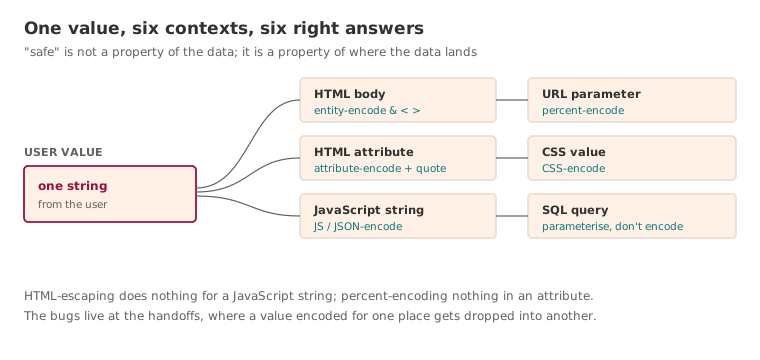
A subtle and common belief is that there's one canonical way to "make a value safe". There isn't, and acting as though there is produces some of the most stubborn bugs going. What counts as safe depends entirely on where the value lands:
- HTML body.
- HTML attribute.
- JavaScript string.
- CSS value.
- URL parameter.
- SQL query.
- Shell command.
A value that's perfectly inert in one of those can be live ammunition in another. HTML-escaping a string does nothing to make it safe inside a JavaScript string literal, and percent-encoding for a URL won't save you in an HTML attribute. The bugs cluster exactly at these handoffs, where a value encoded for the place it came from gets dropped into a place with different rules.
Payment and checkout flows need extra care
All of this gets sharper the moment money is involved, and checkout is where JavaScript security stops being academic. A checkout page tends to gather, in one place, just about everything an attacker could want:
- Customer identity.
- Delivery addresses.
- Promotions.
- Payment tokens.
- Fraud signals.
- Third-party scripts.
- Gateway integrations.
The frontend should not be anywhere near raw card data unless the organisation has deliberately chosen to take on the PCI scope that comes with it, which is a decision made on purpose with a compliance team in the room, not by accident in a sprint. Hosted fields, gateway SDKs and tokenisation exist precisely so most teams never have to touch the card number at all.
Even on the safe path, the same handful of things go wrong. Sensitive data finds its way into logs. Payment tokens get exposed. A checkout page accumulates third-party scripts. Client-side totals get trusted. A discount gets applied in the browser and nowhere else. An idempotency key gets reused in a way that turns one charge into two, or two into one.
The line that holds all of this together is straightforward: the backend calculates the final payable amount, always. The frontend displays a price. It does not get to be the authority on price, because the authority on price is the thing an attacker will go after first.
Logging can leak secrets
JavaScript applications are remarkably good at leaking sensitive data through their own logs, usually with the best of intentions:
console.log("token", token);
console.log("payment response", response);
console.log("user", user);
Harmless on your laptop. In production, where logs, monitoring tools and session-replay platforms are all hoovering up whatever the page emits, that's a token or a full payment response sitting in a third-party dashboard with a different access model from the one you carefully designed. It's at its most dangerous in exactly the flows you'd least want it: checkout, authentication, account management.
Client-side telemetry deserves the same scrutiny as backend logging, not a fraction of it. A decent heuristic: if you wouldn't paste it into a support ticket, don't send it to an analytics platform either.
Security is mostly boundaries
Step back from the individual pitfalls and they rhyme. Almost every JavaScript security failure is the same mistake in a fresh context: trusting something that hadn't earned it.
Trusting the browser. Trusting user input. Trusting local storage. Trusting CORS to authenticate. Trusting a hidden field to stay hidden. Trusting a third-party script to behave. Trusting that a request came from your own UI because, well, where else would it have come from.
The mental model that survives all of it is short enough to keep in your head:
Anything outside the server's control is input.
That isn't an argument for ignoring frontend security; it's the opposite. The frontend is where the power is, because the browser is extraordinarily capable and most of that capability is available to whoever happens to be driving. The work is to build systems that stay safe even when that capability is pointed back at you.
You can think of it the way you'd read a position rather than a single move. The numbers, the headers, the hidden field - none of them mean anything until you know which side of the board they're on. Decide that first and most of these bugs stop being decisions at all.
Because the uncomfortable truth is that hardly any of them are clever. They're boundaries that someone, somewhere, simply forgot to defend.
Further reading
- OWASP Cross Site Scripting Prevention Cheat Sheet: the canonical, context-by-context rules for output encoding and the dangerous DOM sinks like
innerHTMLto keep away from. - MDN: Content Security Policy (CSP): the clearest practical guide to writing a real policy, including nonces, hashes and why
strict-dynamicbeats an allowlist. - OWASP Cross-Site Request Forgery Prevention Cheat Sheet: the actual menu of CSRF defences (SameSite, synchroniser tokens, custom headers) rather than the vague sense that SPAs made it go away.
- OWASP Prototype Pollution Prevention Cheat Sheet: why
Object.create(null),Mapand schema validation beat a naive deep merge, with the edge cases spelled out.
Keep reading
New writing, now and then
Occasional notes on platform engineering, building dependable software and that constant buzz word we doom scroll past on LinkedIn! No cadence promised.